Beta Not the live site. Pages in review Live site →
Loft

Production
runs on LOFT

For studios making animation and VFX with AI: bid, crew, schedule, generate, review and cost in one platform. Your numbers agree, and a slipping show shows up while there's still time.

Free to sign up, no credit card.

One show, start to finish

A demo show's path through LOFT, from bid to P/L.

Show
The Keeper's Light
Shots
9
Weeks
6
Type
Demo project
  1. 01Bid74 daysof bidEvery shot, every step, plus 21,500 AI tokens.
  2. 02Schedule39 tasksscheduledPublishing the bid creates the tasks, dates and crew bookings, with no retyping.
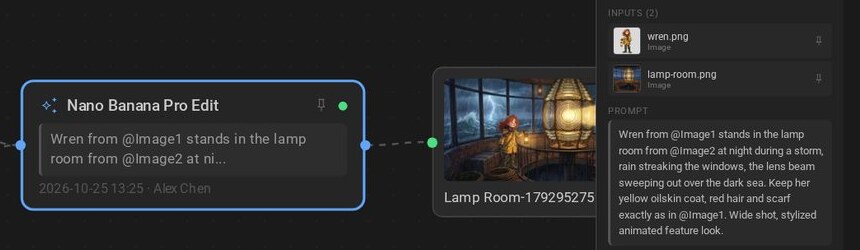
  3. 03GenerateOn the shotEach image keeps the model, inputs and prompt that made it.
  4. 04ReviewDailiesApprove a take or send it back with a note. Clients see only what you share.
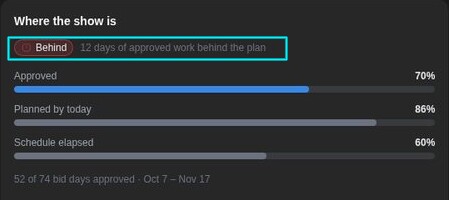
  5. 05Progress70% / 86%approved / plannedWork approved against work planned, so you see how far behind you are and where.
  6. 06P/L41.0%marginLabour and AI spend against the bid, on one page.

Know where every image came from

Buyers, distributors and legal teams increasingly ask what went into a frame. LOFT records it as the work happens, so the answer is already there.

  • On every takeThe model, inputs and prompt, who ran it and when.
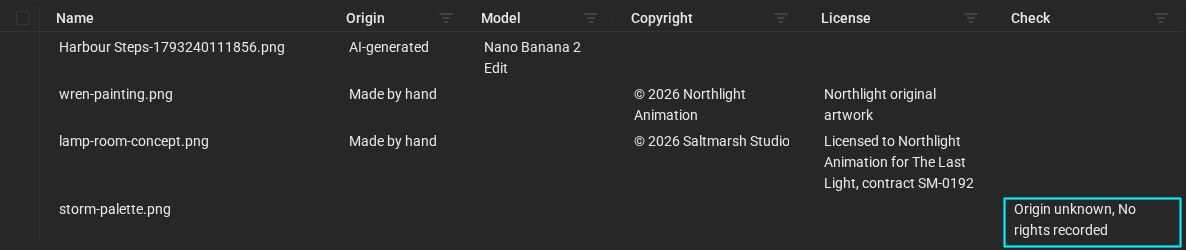
  • On every sourceCopyright and license read from the file on upload, and whether it was captured, made by hand or AI-generated.
  • Before it's a problemAnything with an unknown origin or no rights recorded is flagged. Export the whole record as a CSV.
Dependency Report for a keyframe: four files with origin, model, copyright and license. storm-palette.png is flagged: origin unknown, no rights recorded.
storm-palette.png came in with no origin and no rights, so LOFT flags it.

See it work in the tutorial

Built for teams who answer for the result

Bid it, staff it, and know you're behind before the client does.

For Producers & heads of production

The bid becomes the schedule and the crew bookings. Progress then compares approved work with the plan, every day.

  • Check capacity by department before you sign.
  • Assign a whole column of tasks in two clicks, or in one sentence to the Assistant.
  • The late list shows what slipped, whose it is, and what it's holding up.
Where the show is, for The Keeper's Light: behind, with 12 days of approved work behind the plan. 70% approved against 86% planned by today, with 60% of the schedule elapsed.
Behind by 12 days of approved work: 70% approved against 86% planned.

Generate on the shot, and keep the recipe.

For Artists & leads

Image and video models run inside the project, on the asset they're for. Linked characters and locations are ready as references.

  • Every take records its model, inputs and prompt. Run it again or switch models in one click.
  • Directors draw on the frame. The note lands on the take and you're notified.
  • The cut points at each shot instead of copying it. Publish a new take and the cut updates, with no reconform, and the take's record comes with it.
A Nano Banana Pro Edit that made the Lamp Room keyframe, with its recorded recipe: two input images, wren.png and lamp-room.png, and the full prompt
The recipe stays on the take: model, inputs and prompt.

AI spend and labour in the same P/L.

For Studio owners & finance

Every generation is costed on its shot, against a budget that comes from the bid. Hours and tokens land in the project's P/L.

  • Soft budgets flag overspend. Hard limits stop a take before it runs.
  • See spend by shot, by artist, by model and by month.
  • Clients get their own library, and see nothing else.
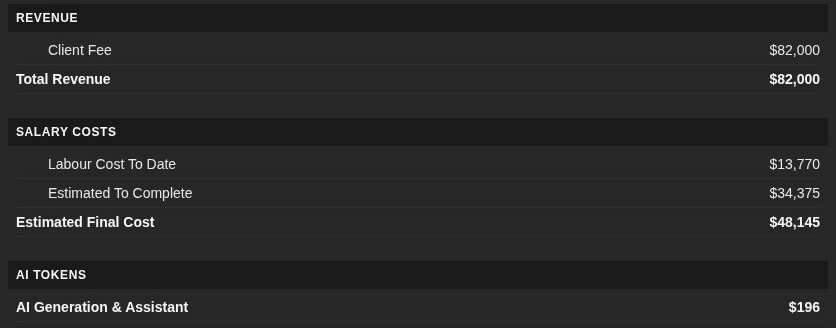
Project P/L: client fee $82,000; salary costs of $13,770 to date and $34,375 to complete, an Estimated Final Cost of $48,145; $196 of AI generation and the Assistant
$82,000 fee − $48,145 labour − $196 AI = 41.0% margin.

Or just ask.

For Everyone

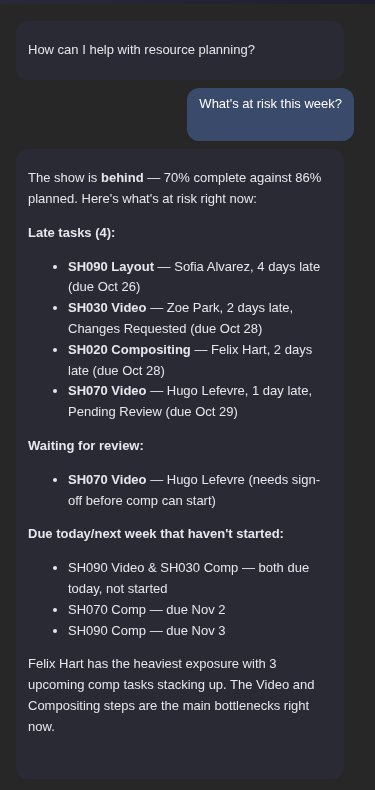
The Assistant reads the same data you do. Ask what's at risk this week, and it names the late shots, who has them and what's waiting on review. It can also open the page that shows it, or make the change.

  • An API and an MCP server let your own pipeline tools and agents in too.
The Assistant answering 'What's at risk this week?' with late tasks, work waiting for review and what's due next

Forged in production

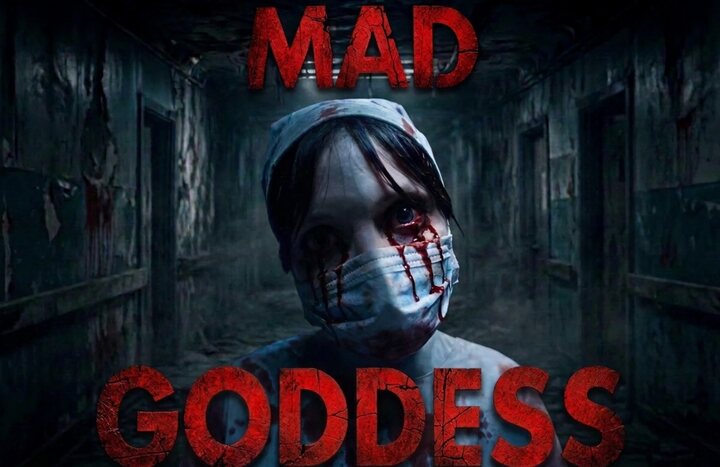
  • Mad GoddessMad Goddess key artConceived and directed by Phil Tippett, coming 2027. The sequel to Mad God, with a teaser managed end to end in LOFT.
  • SentinelA still from Sentinel: soldiers in gas masks advancing through a burning woodFilm in development: An ancient force awakens in Sentinel, a haunting stop-motion vision where towering machines, forgotten worlds, and mythic creatures stand watch at the edge of extinction.
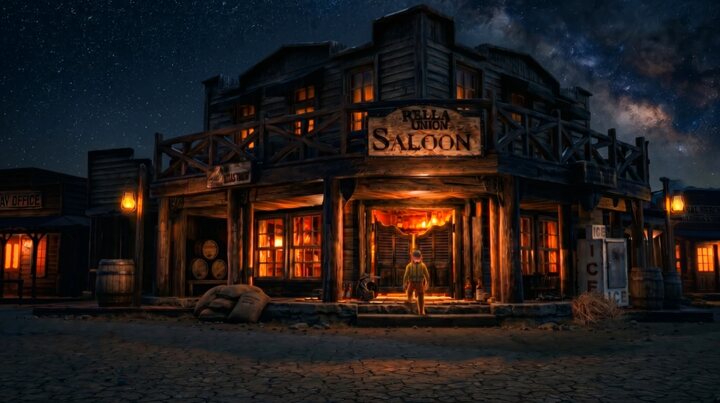
  • PequinA still from Pequin: a saloon in a frontier town at nightAn experimental film: a finished one-minute piece, cut and versioned entirely in LOFT.
  • Jellyfish PicturesWhere LOFT began, used studio-wide by hundreds of people.

LOFT’s founders built Nelnet, which earned a Technology & Engineering Emmy, and TACTIC, deployed across 350+ studios. About the company

Phil Tippett
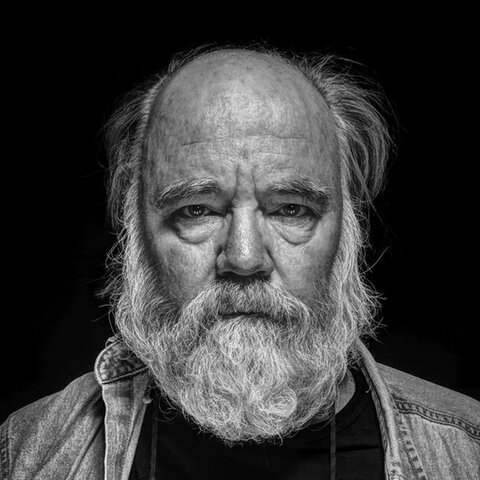
Advisor Phil Tippett Director, Mad God and Mad Goddess Two-time Academy Award winner and the visual effects pioneer behind Star Wars and Jurassic Park. He advises LOFT.
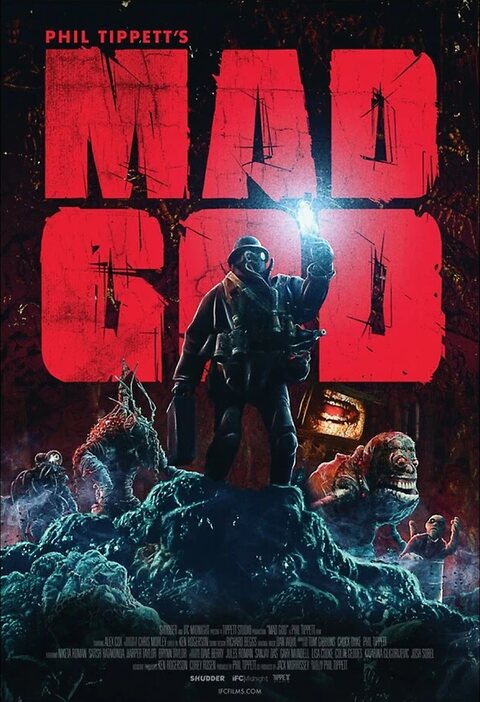
Poster for Mad God, directed by Phil Tippett

Phil Tippett Art

FAQ

What is LOFT?

One platform for running a professional production: bid, crew, schedule, generate, review and cost, with AI built in.

Is LOFT an AI model?

No. LOFT runs image, video and voice models from several providers, on the shot they're for, and keeps the record of what each one made. Models change. Your production record stays.

Does it replace the tools my artists use?

No. It sits alongside them, managing the assets, versions and AI activity around the work.

Do I need special hardware?

No. LOFT runs in your browser, and generation runs on the model providers' servers. Large projects still need storage and bandwidth.

Can I try it for free?

Signing up is free, with no credit card, and you can look around every app. Generating uses tokens, which come with a paid seat.

Who needs a paid seat?

Anyone who generates, schedules or bids. Reviewers and clients can join free: they see the work and leave notes.

How do tokens work?

Each paid seat adds tokens to a balance your whole organization shares each month. Need more? Top up anytime, with no plan change.

Can you walk our team through it?

Yes. Book a demo, and bring your questions about security and where your data lives.

Can we use our own model accounts?

Yes, on the Enterprise plan. Talk to us.

Set up your studio

Bring in your people, start a project and bid your first show. The tutorials walk you through each step.

Free to sign up, no credit card. Reviewers and clients join free. Bringing a whole studio? Book a demo.